- No measurements yet.
Add 2 pushpins to measure.
Pushpin
How to Use This Online Protractor
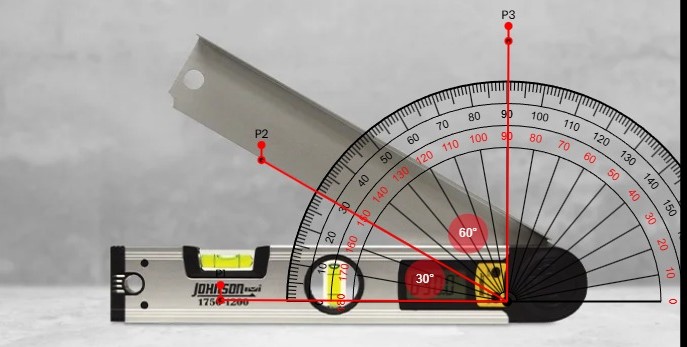
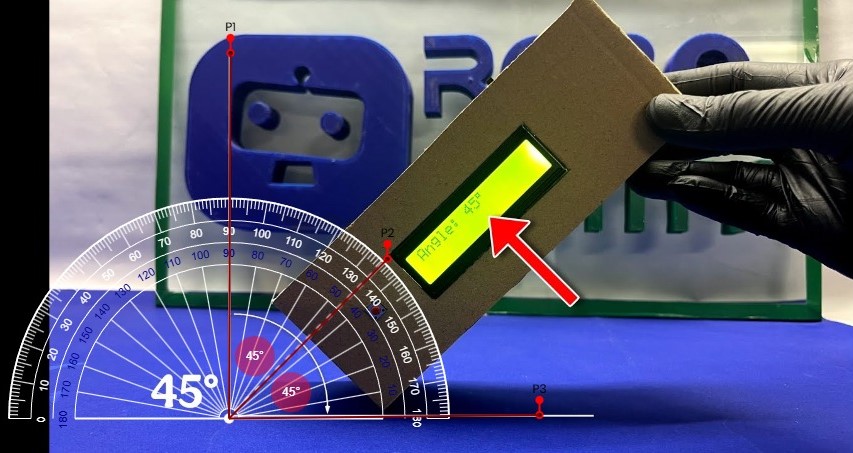
- You can directly measure angles of real-world objects displayed on your screen.
- To move the protractor around, simply drag it from the center.
- Adjust the protractor’s size by changing its radius to make it larger or smaller.
- Just like a real protractor, you can freely rotate this one.
- Clicking just outside the protractor’s edge adds a pushpin.
- Place two pushpins to display the angle between them.
- Double-click a pushpin to remove it, or drag it to reposition it.
- All these features are also accessible via the control panel buttons.
- You can set any image as the background – zoom in/out, reposition it, and measure angles directly over it.
- Drag and drop images into the background area easily.
- Use Ctrl+V to paste an image directly into the background.
- Hold Ctrl and drag to move the background, or manually set the displacement.
- You can download and share your work completely free of charge.
- Mobile browsers may not support drag and drop – use the on-screen buttons instead.
- Want more space? Press F11 to switch to full screen mode.
- Pro Tip: Hold
Shiftwhile rotating to snap precisely to 5° increments (e.g. 45°, 90°). - Zoom Tool: A magnifying glass appears automatically when you drag or rotate to help you see details.
What is Online Protractor?
Our online protractor brings a modern upgrade to digital angle measurement. It’s built for precision, using intelligent algorithms that allow you to measure angles with exceptional accuracy — often more reliably than a traditional physical protractor.
Designed for everyone — from students and teachers to architects and engineers — this tool fits into any workflow. Whether you’re checking design angles, analyzing structures, or learning geometry, it adapts to your purpose.
Because it runs directly in your browser, there’s no installation required. It works smoothly across laptops, desktops, tablets, and smartphones — so your measurement tool is always right at your fingertips.
- Sub-pixel Precision Engine
- AI-Powered Smart Alignment
- Real-Time Trigonometric Processing
- Progressive Web App (PWA) Design
- Cross-Platform Compatibility
- Zero-Installation Access
Real-World Applications
Engineering & Design
Technical drawing verification and mechanical part analysis
Construction & Architecture
Roof slopes, building angles, and structural alignments
Education & Learning
Interactive classroom demonstrations and homework assistance
DIY & Crafts
Furniture building, woodworking, and home improvement projects
Scientific Research
Data analysis from images and experimental documentation
Quality Control
Manufacturing inspection and precision verification
Angles and Degrees
Angles are measured in degrees, represented by the symbol °.
- A full circle has 360° (360 degrees)
- A half circle or straight angle is 180°
- A quarter circle or right angle is 90°.
How do you feel about this protractor tool?
This protractor tool is thoughtfully designed to make angle measurement simple, accurate, and accessible. Whether you're a student, teacher, designer, or someone who just needs quick measurements — it gets the job done effortlessly.
With features like transparency, rotation, resizing, and direct image measurement, it’s a modern upgrade to the traditional protractor. The ability to upload images and precisely measure angles on them adds incredible flexibility.
It’s built with real-world needs in mind — practical, intuitive, and crafted with care to deliver a better measurement experience.
Measurement Accuracy
This online protractor is designed for educational and general measurement purposes. While we aim for high accuracy, measurements should be verified using professional tools for engineering, construction, or safety-critical applications.
Professional Use Limitations
This tool does not replace certified surveying instruments or precision measurement equipment. For professional engineering, architectural, or industrial tasks, always rely on industry-approved instruments and validation methods.
Educational Use
Ideal for exploring geometry concepts, classroom demonstrations, and basic measurement tasks. Students and teachers can use it to understand angle relationships and practical measurement techniques.
Device & Display Factors
Accuracy may vary based on screen size, resolution, browser zoom, and display calibration. For best results, use a desktop computer with a high-resolution screen and ensure your browser is updated.
No Warranty
This tool is provided "as is" without any warranties. We do not guarantee the accuracy, completeness, or suitability of results. Users are responsible for confirming measurements when used for real-world purposes.
- Use the highest resolution images for maximum precision
- Ensure strong contrast between the protractor and background
- Take multiple measurements to avoid human error
- Validate critical measurements with physical instruments
- Use professional-grade tools for commercial applications